

REA: Reverse Engineer Anything.

I pointed REA at the live Excalidraw whiteboard and built Quire, an original board you can open and draw on. Here is the prompt, what the inspection recovered, and the jobs I would not hand to REA.
REA: Reverse Engineer Anything
I pointed a coding agent at the live Excalidraw whiteboard, told it to use REA, and came back with Quire: an original board you can draw on today. This is the prompt, the evidence, and the jobs I would not give this tool.
Open Quire Quire on GitHub GitHub · morluto/rea rea.tools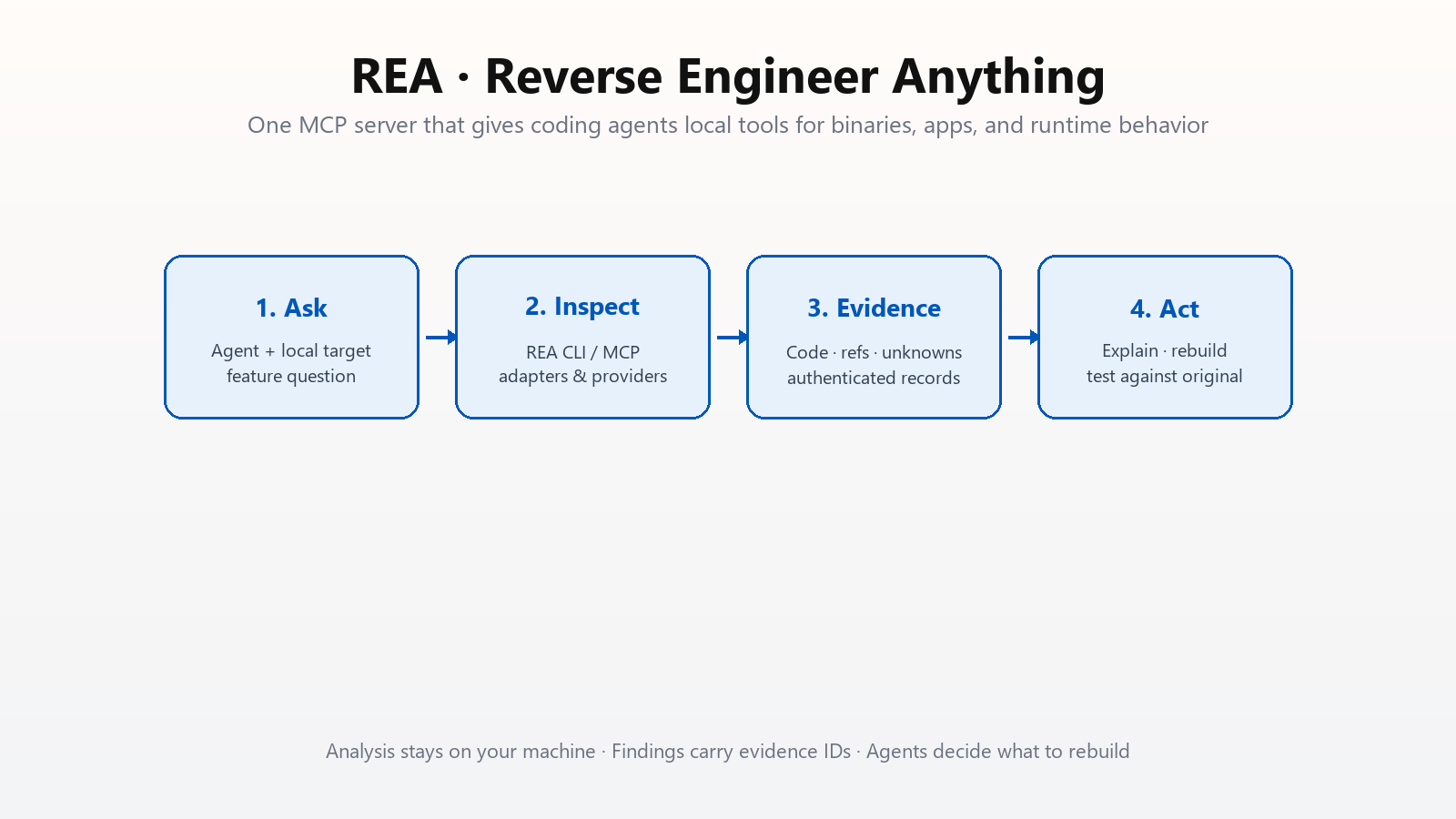
See a feature you like. Want it in your own product. The usual path is guesswork: poke the UI, skim network tabs, hope a blog post exists, or accept that the interesting logic lives inside a binary you cannot read. REA (Reverse Engineer Anything) is an open-source project that changes the shape of that path. It gives your coding agent a local MCP server and a matching CLI so the agent can inspect real programs (apps, libraries, packages, captures) and return findings with evidence, limitations, and follow-up hooks instead of vibes.
The result is not a fork. Quire is a small sketch board I can host myself. It draws rectangles, diamonds, ellipses, arrows, lines, freehand ink, text, and sticky notes. It pans, zooms, undoes, and keeps the drawing in the browser. The menu and the style card use my own words. Nothing in it signs you into Excalidraw, and nothing in it is their source code. The rest of this essay is how that happened with REA, the prompt you can paste, and the work I would refuse to point this tool at.
“REA is for lawful research, education, interoperability, software preservation, and analysis of software you own or are authorized to examine.”
That line from the project disclaimer is not decoration. Everything below assumes authorized targets. Commercial engines such as IDA Pro, Hopper, and JEB remain under their own licenses; REA does not grant keys or activation entitlements.
What problem REA actually solves
Coding agents are already good at writing code from a description. They are much weaker at reading someone else’s shipped artifact and turning that reading into a faithful reconstruction. The gap is tooling. An agent without reverse-engineering adapters can only invent. An agent with a GUI decompiler still needs a human to click around, copy snippets, and paste them into chat.
REA sits in the middle as a machine-readable investigation layer:
- Local analysis. Targets stay on your machine. The agent receives tool results; your model provider has its own data policy, but REA itself is not an upload service for your app.
- Shared workflows for CLI and MCP. The same application layer powers one-shot terminal commands and long-lived agent sessions.
- Evidence, not scrapbook notes. Results are structured records with identities, coverage, limitations, and comparison contracts.
- Honest unknowns. Facets that were not observed stay unavailable. Agents are supposed to see the fog, not paint over it.
In practice that means prompts like “understand how search works in this Notes app, show the evidence, and build a similar feature for my project” become a real workflow instead of a wish.
Setup: register the MCP, then restart the agent
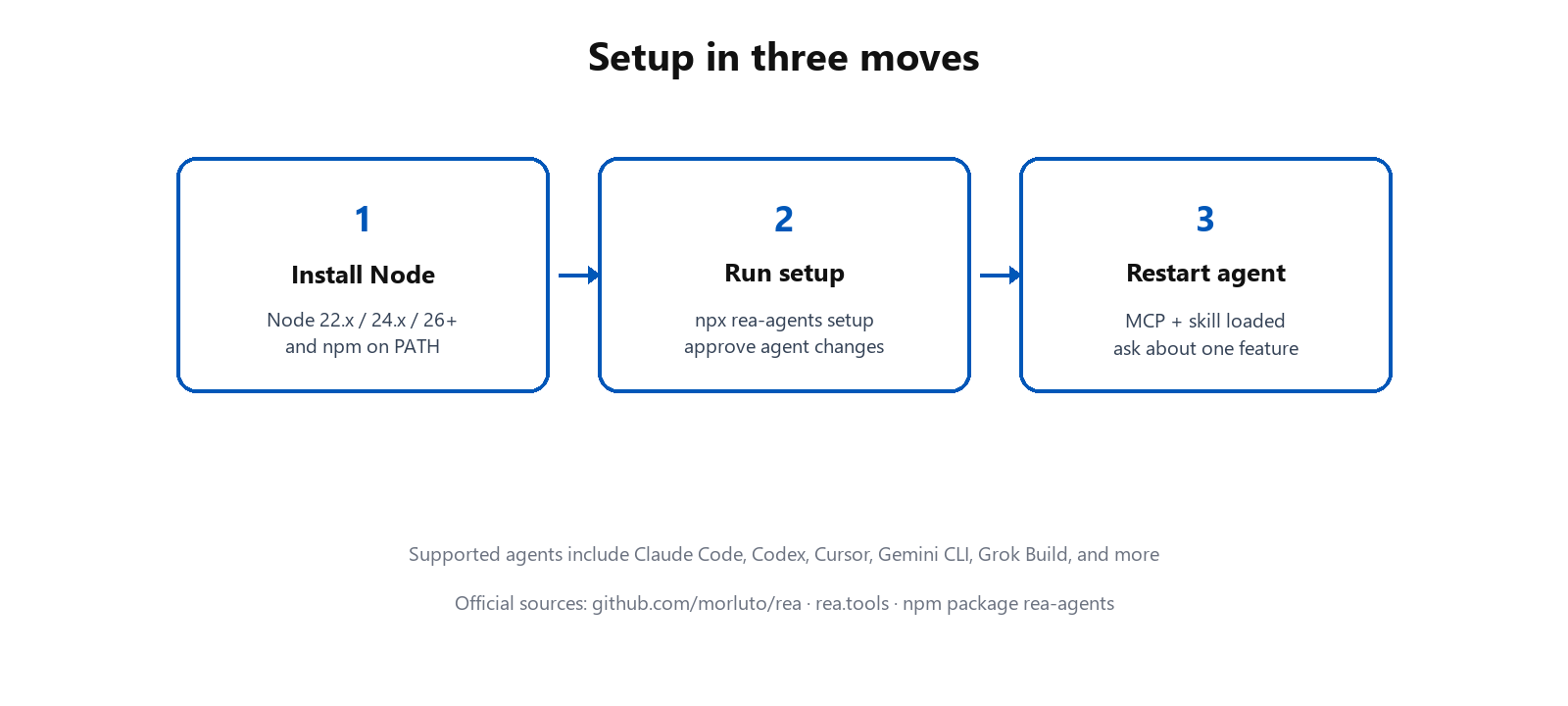
npx rea-agents setup, approve changes, restart.REA requires a current Node.js line: 22.x (>=22.23.4), 24.x (>=24.22.1), or 26.12.1+, plus npm. With that in place, copy and run:
npx rea-agents setupSetup walks agent selection, proposes configuration changes with backups, and installs matching workflow instructions (the “skill”). Supported agents include Claude Code, Codex, Cursor, Gemini CLI, Grok Build, and others documented in the installation guide. After approval, restart the agent so the MCP registration loads.
Two useful knobs from day one:
- Compact MCP schemas by default. Input schemas stay compact to reduce context overhead. Set
REA_MCP_INPUT_SCHEMA_PROFILE=fullwhen you need the complete advertised field guidance. - CLI without a global install. Prefer
npx -y rea-agents@latest …for one-offs, ornpm install --global rea-agentsfor thereacommand andrea update.
Get REA only from the official sources named in the README: the GitHub repo, rea.tools, or the rea-agents package. A similar repository name is not proof of authenticity.
The investigation loop
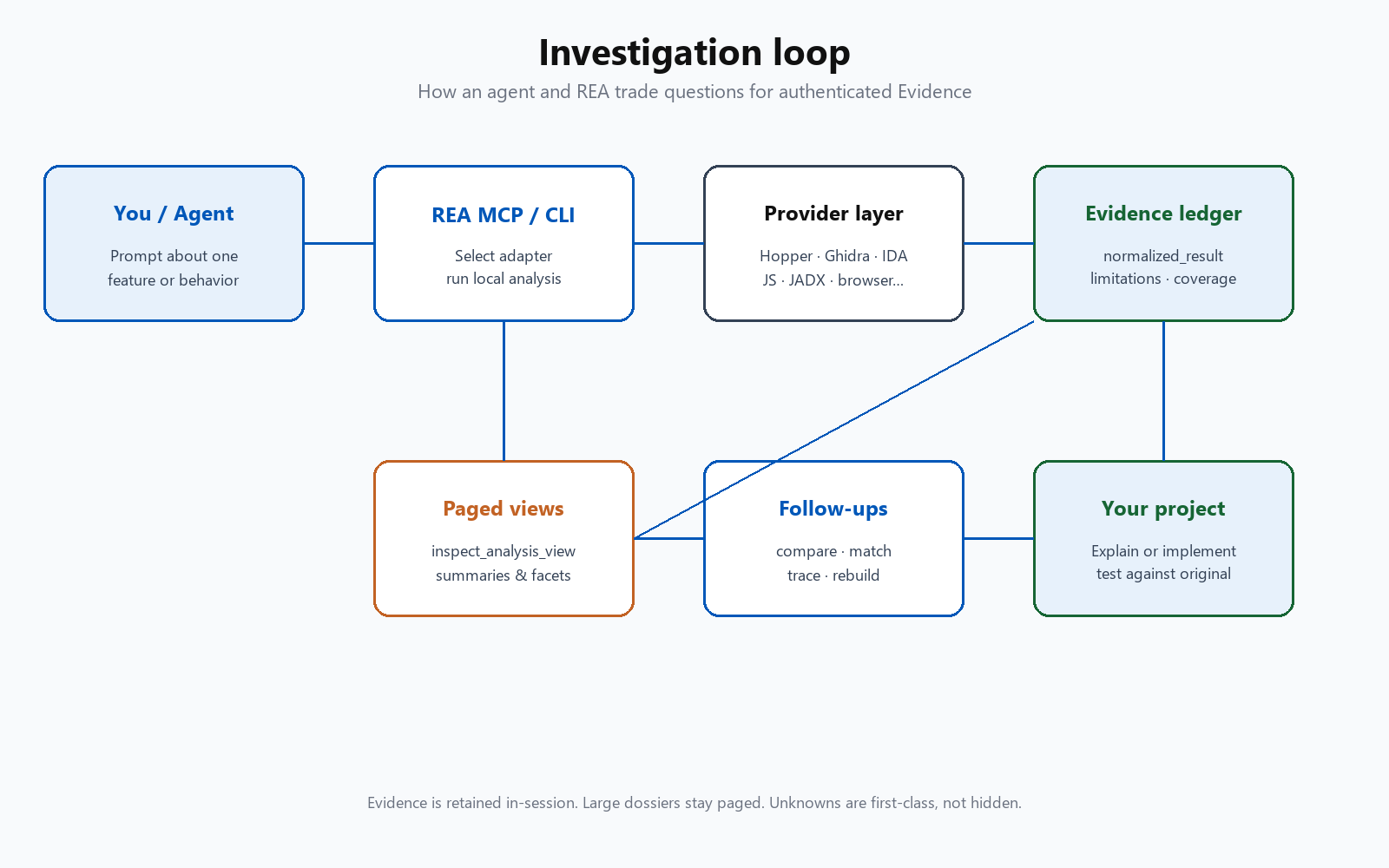
REA’s own framing is refreshingly concrete. Your agent asks about a local target. REA inspects and traces through local analysis adapters. It returns code, references, and unknowns. The agent uses that material to explain behavior, implement a version in your project, and test. Follow-up questions reuse retained Evidence instead of starting from zero every turn.
That loop is why MCP matters here. A single chat paste of decompiled C does not scale to an Electron app with thousands of modules, or to a native library where the interesting function is three call edges away from the string you searched. Session-retained Evidence lets the agent page a summary, open one module, compare two builds, or match native procedures before drawing conclusions.
A prompt that fits the loop
Understand how search works in the Notes app, show me the evidence,
and build a similar feature for my project.
One feature. One target. Demand for evidence. A rebuild goal. That is the REA shape.
Architecture: layers that stay honest
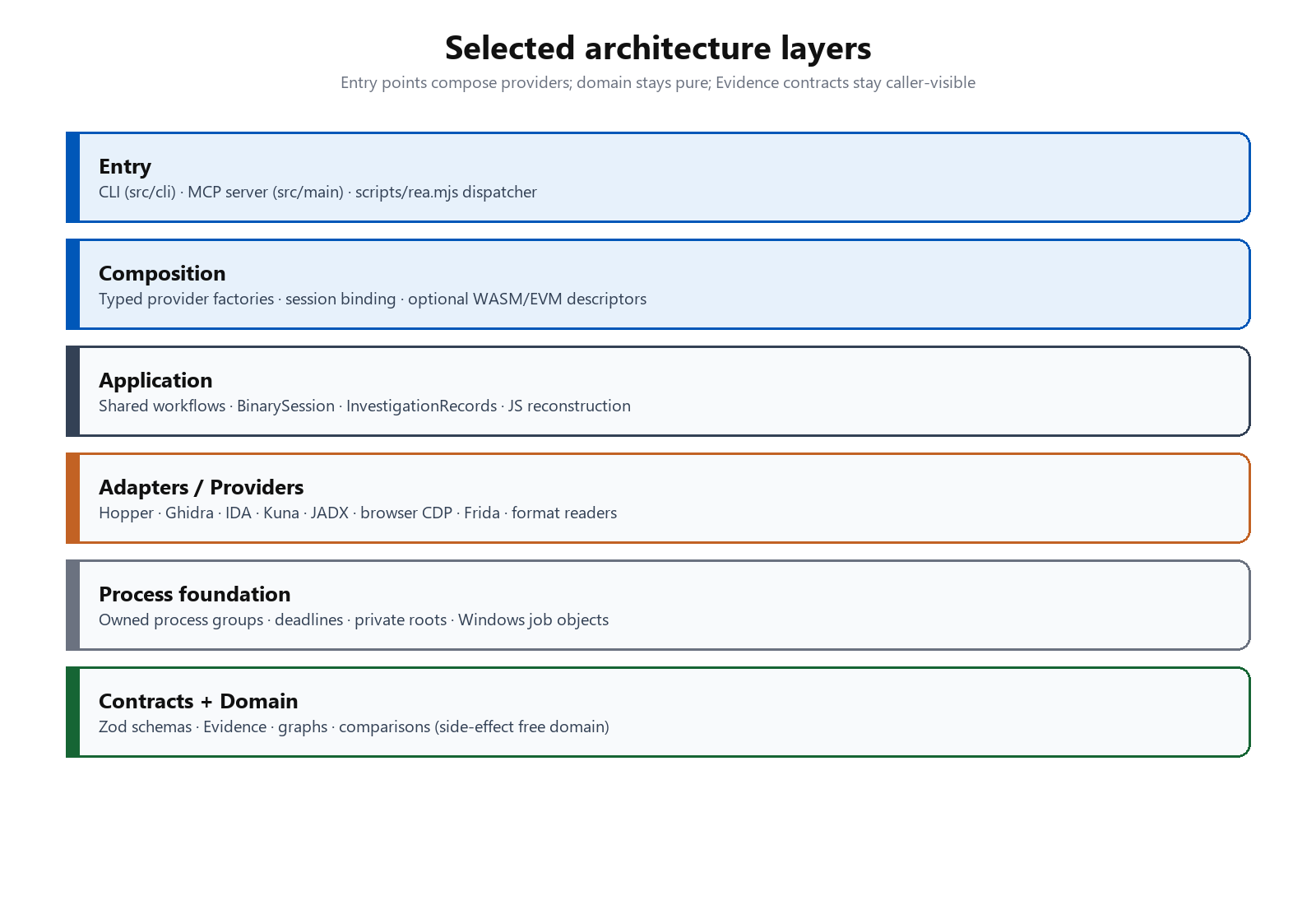
The repository’s architecture diagram is dense on purpose. A useful reading for practitioners is the ownership split:
- Entry points.
scripts/rea.mjsdispatches MCP (stdio by default, optional streamable HTTP) and one-shot CLI work.src/mainowns the MCP server lifetime;src/cliowns terminal adapters. - Composition. Fresh typed provider and session factories bind a target once. Optional loaders cover specialized worlds such as WASM and EVM.
- Application workflows. Shared CLI/MCP investigations,
BinarySession, snapshot caches, JavaScript artifact reconstruction, and investigation records with Evidence ledgers. - Provider adapters. Hopper’s Python bridge, Ghidra’s packaged HeadlessScript, IDA’s MCP adaptation, JADX for Android, browser CDP/Playwright capture, Frida, format readers for Go/Rust/IL2CPP/GPU/models, and more.
- Process foundation. Owned process groups, private roots, deadlines, bounded reads, cleanup, and Windows job-object helpers. Reverse engineering tools are messy; lifecycle ownership is half the product.
- Contracts and domain. Caller-visible schemas live in
src/contracts. Domain modules stay side-effect free: graphs, comparisons, Evidence semantics.
Provider selection for deep native analysis is deterministic. Candidates are sorted; there is no silent fallback to “whatever happened to work.” That is stricter than many agent wrappers, and it is a feature when you need reproducibility.
Evidence: the unit of truth
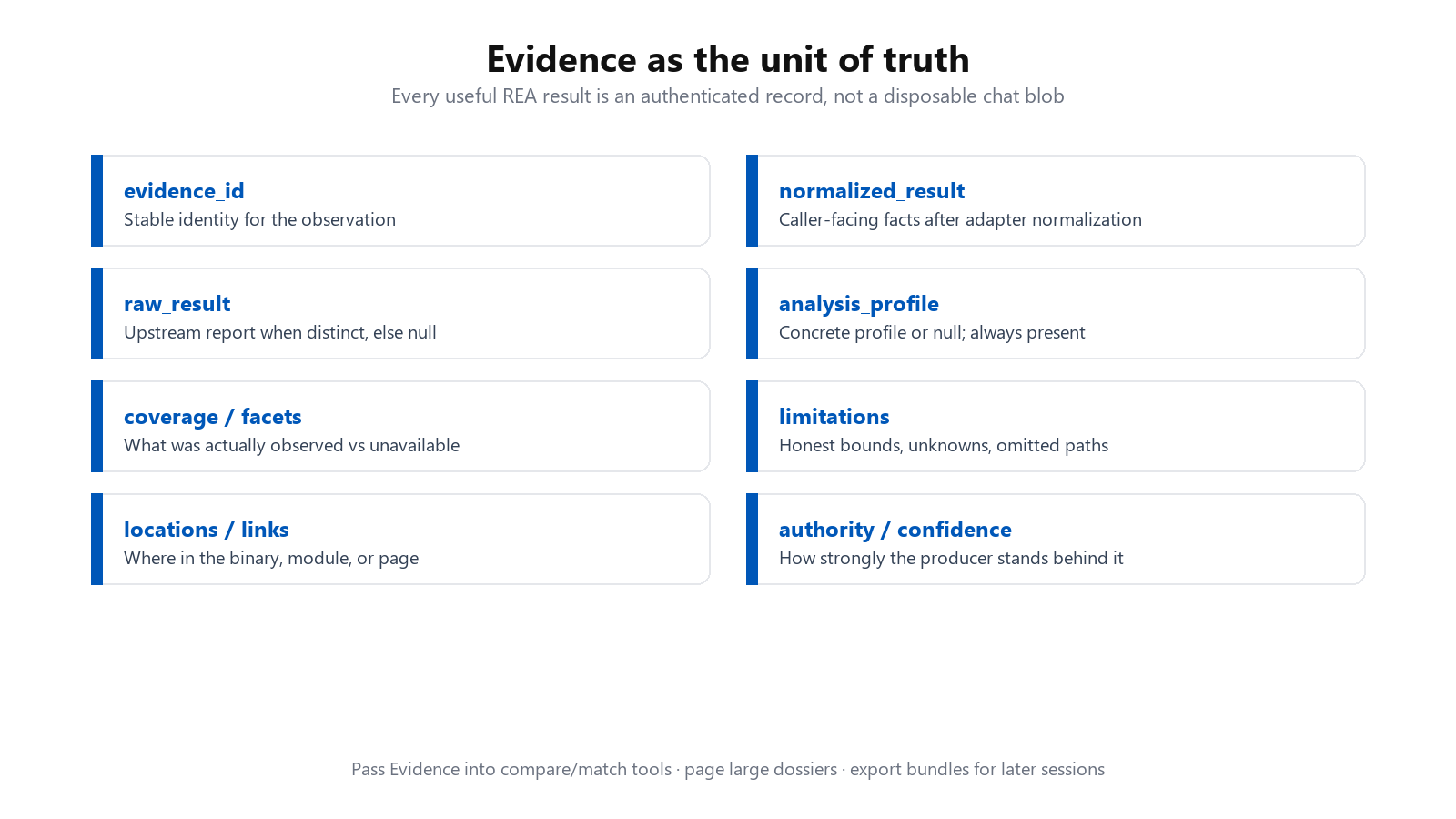
Most “AI reverse engineering” demos dump text into the context window and hope. REA’s MCP contracts treat Evidence as a first-class object. Evidence-producing tools return the complete canonical record in both text and structured content. Agents should read structuredContent.normalized_result for the operation result and structuredContent.evidence_id for identity. The same record is retained in the session bundle.
Important contract details that change how you prompt:
analyze_functionis paged by default. Withoutdetail, the complete dossier stays retained while the tool returns aninspect_analysis_viewsummary whoseparent_evidence_idnames the full record. Comparison tools that need dossiers reject the summary; pass retained Evidence by id.analysis_profileis always present (object or null). Records that omit it are rejected. Identity is semantic, not just “looks similar JSON.”- Coverage and facets are explicit. Function dossiers can declare availability for pseudocode, assembly, callers, callees, references, strings, CFG, and more. Unavailable facets keep reasons. Comparisons keep dimensions
unknownwhen a required facet was not observed, instead of pretending equality. - Failures are structured. Tool errors return canonical diagnostics with codes, remediation, and optional recovery kinds such as
inspect_input_contractorinspect_timeout_state. Raising only the MCP client’s deadline does not extend REA’s provider budget.
On the CLI side, the same philosophy shows up as “save the giant Evidence file, then project views.” The docs cite a 334 MB Obsidian application Evidence file that collapses to about 10 KB as a summary view. That is how agents stay useful on real apps.
npx -y rea-agents@latest analyze-javascript-application /absolute/path/to/app --json > app-evidence.json
# then project a summary or module page with inspect-analysis-view
What you can analyze
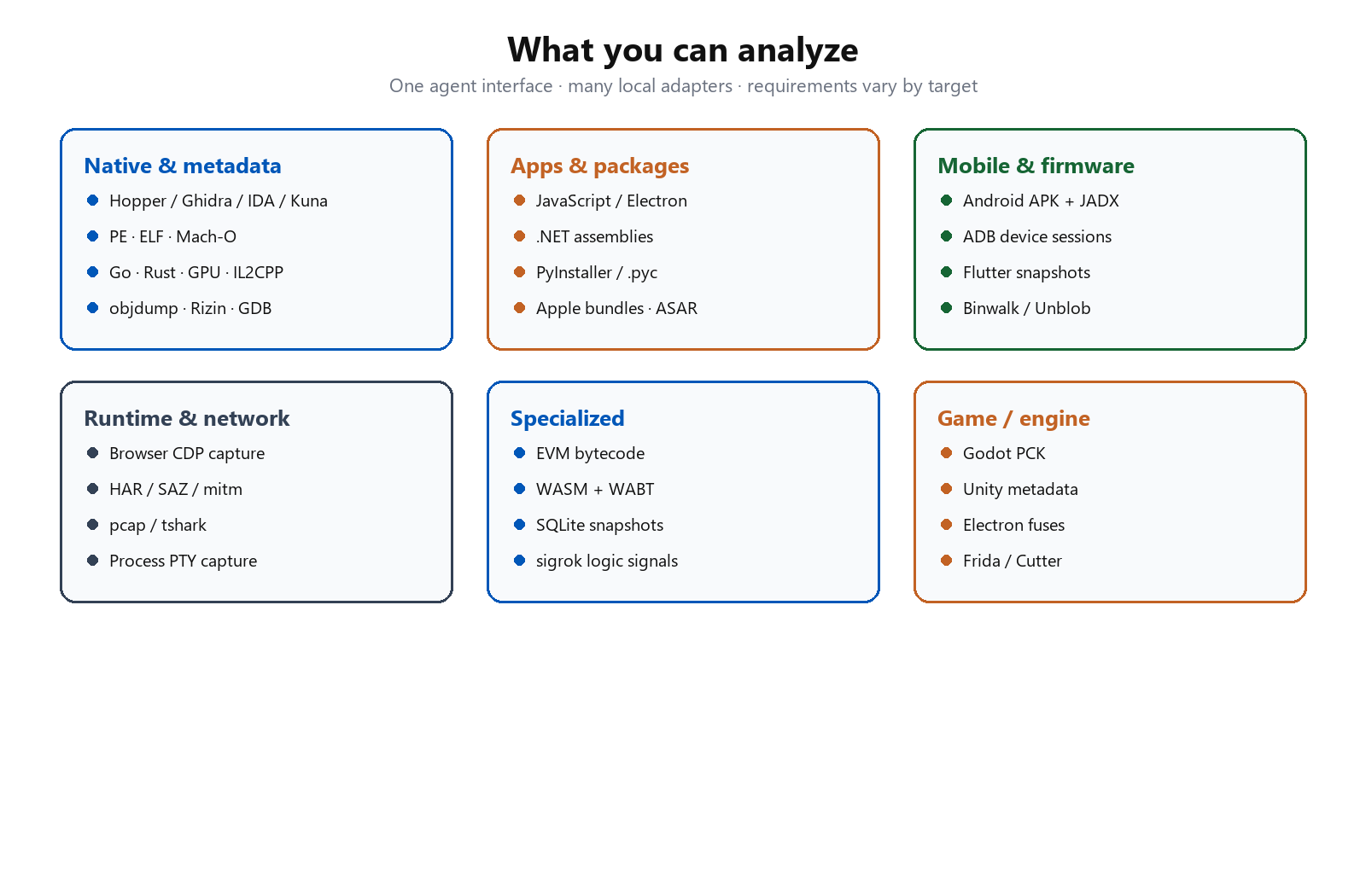
The README target table is long because reverse engineering is not one problem. A compressed map:
Native binaries. Pseudocode, assembly, strings, symbols, calls, references via Hopper, Ghidra, or IDA. Offline ELF layout and crash notes via caller-supplied pwntools on Linux x64. Bundled readers for Go build info, Rust cargo-auditable graphs, GPU code objects, PE certificates and imports, ELF notes, Erlang BEAM, and more.
Managed and packaged apps. Static .NET metadata and CIL. JavaScript/Electron module graphs, source maps, routes, IPC, native add-ons. PyInstaller archives and Python bytecode. Apple bundle anatomy and ASAR inventories.
Mobile and engines. Android APKs through headless JADX, APK signature blocks, Apktool resources, ADB device sessions, Flutter snapshot provenance, Unity IL2CPP metadata, Godot PCK archives, optional JEB over MCP.
Runtime and network. Chrome-family browser observation, HAR/SAZ captures, mitmproxy on Linux, pcap summaries via tshark, process PTY capture, Frida instrumentation, Cutter bridge clients.
Specialized artifacts. WASM with caller-supplied WABT, offline EVM bytecode, SQLite snapshots, model artifact headers (GGUF / safetensors), firmware extraction via Binwalk/Unblob, logic-signal recordings via sigrok.
Static JavaScript and .NET inspection read files without executing the app. Runtime capture uses your user permissions and can interact with the target. Read the matching guide before pointing REA at something that can change state.
Deep native providers
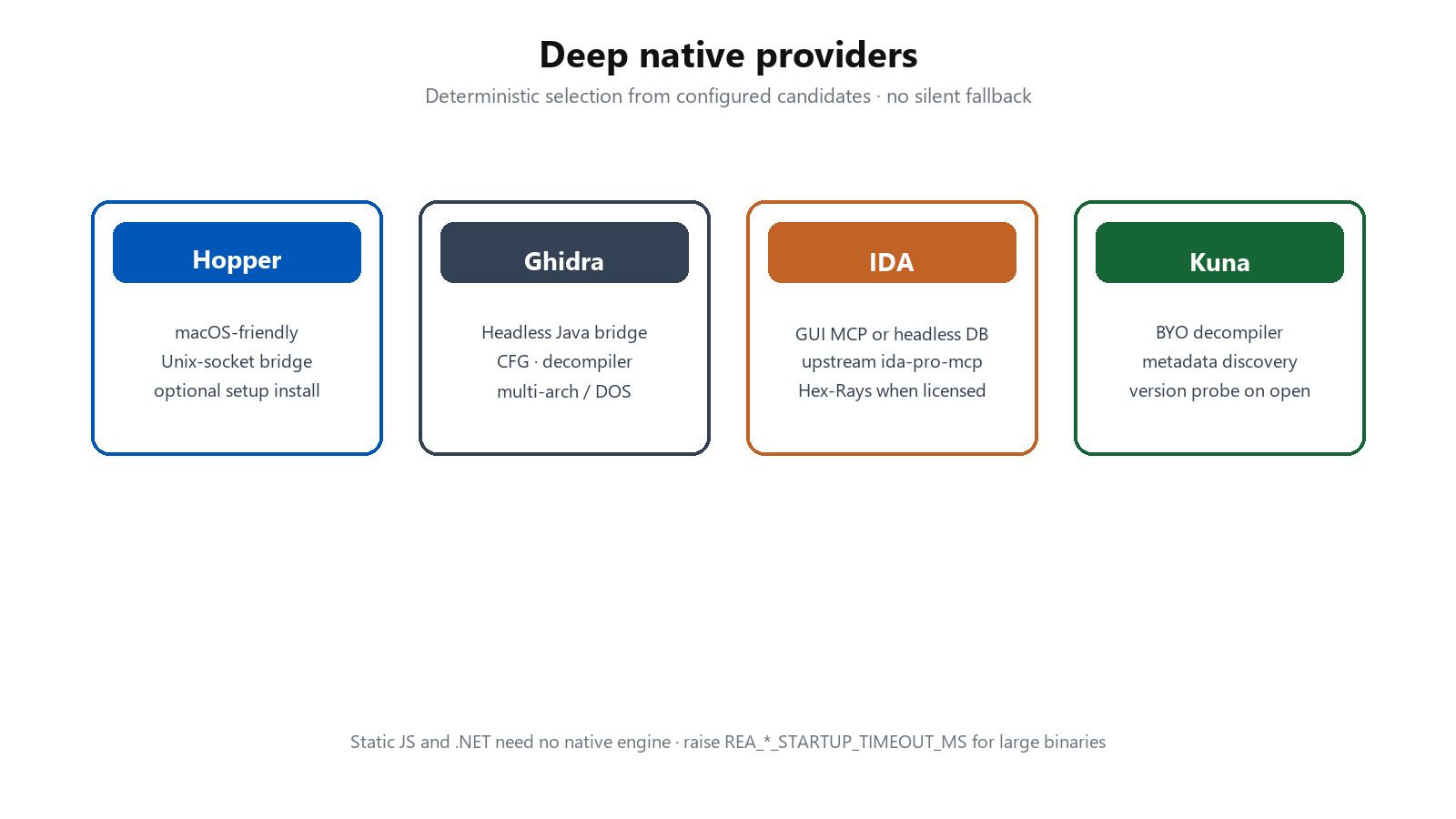
Hopper. Bridge process inside Hopper, Unix-socket protocol, launch management. Setup can optionally install Hopper after approval. On macOS, complete the first-run license/demo prompt in the same user session before unattended jobs.
Ghidra. Packaged HeadlessScript bridge for inventory, decompiler, references, CFG. Multi-architecture notes in the docs include DOS 16-bit analysis and experimental Windows support. Cold starts on large binaries may need REA_GHIDRA_STARTUP_TIMEOUT_MS.
IDA. Adapts the upstream MCP contract, either through a live GUI binding or an owned headless database. Hex-Rays output depends on your licensed installation. REA never supplies cracked tools or keys.
Kuna. Bring-your-own decompiler candidate. Discovery reads metadata; version probes happen when a target opens.
Auxiliary offline inspection can use caller-supplied GNU objdump and Rizin. REA does not install or update those providers for you.
JavaScript and Electron without a decompiler
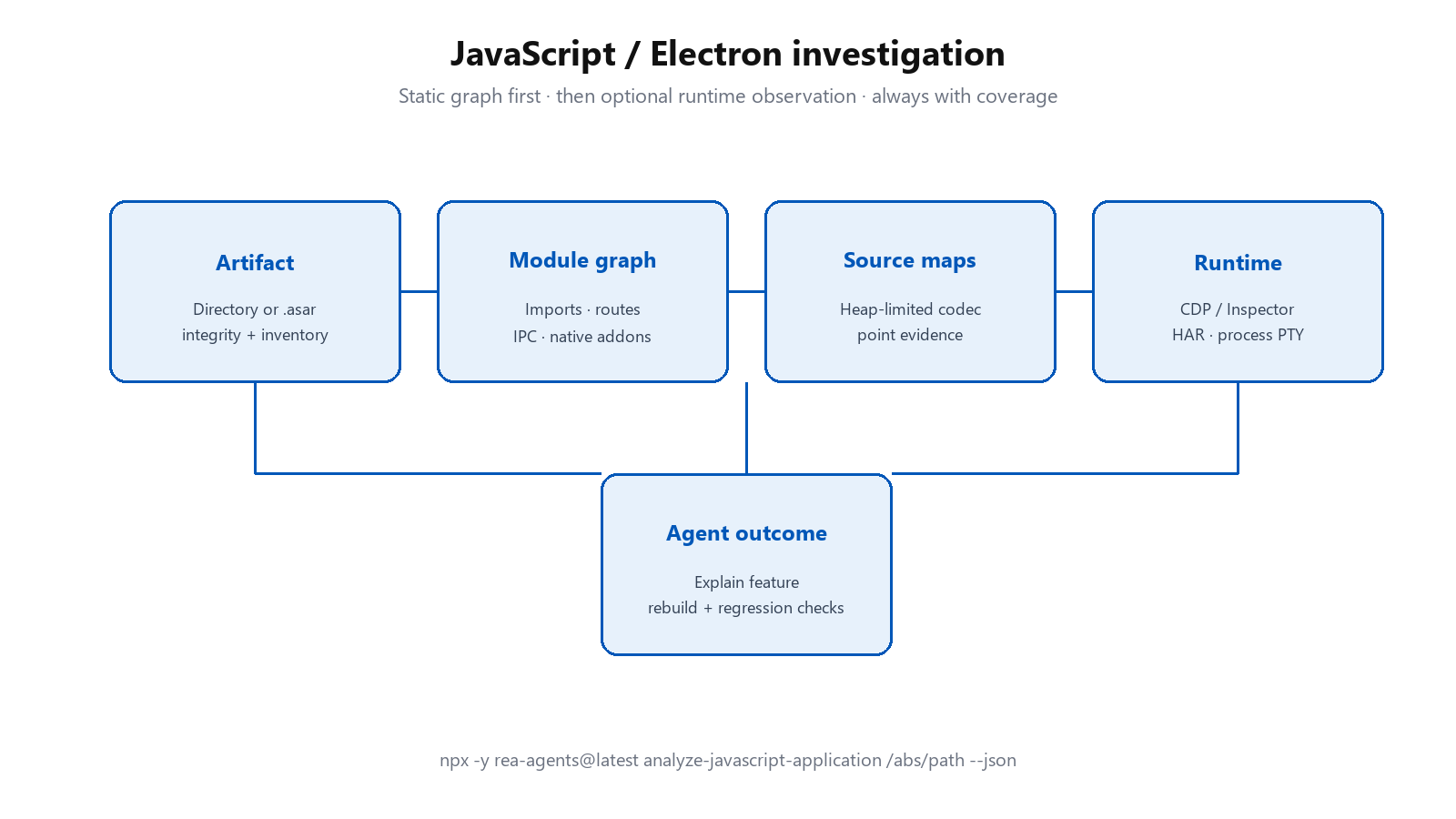
A large share of modern desktop apps are Electron. REA’s JavaScript workflows are therefore not an afterthought. Point the CLI at an extracted application directory or an ASAR:
npx -y rea-agents@latest analyze-javascript-application /absolute/path/to/app --jsonYou get modules, imports, Electron boundaries, and the Evidence that justifies them. Source-map decoding runs in a heap-limited owned Node process so a hostile map cannot casually eat the agent host. Runtime observation (CDP, Inspector, captures) is optional and separate from the static graph. The Notion showcase on rea.tools follows this pattern: find the renderer clipboard API, walk preload and IPC into the main process, and inspect rich clipboard formats with evidence at each hop.
What I actually built: Quire, from the live Excalidraw site
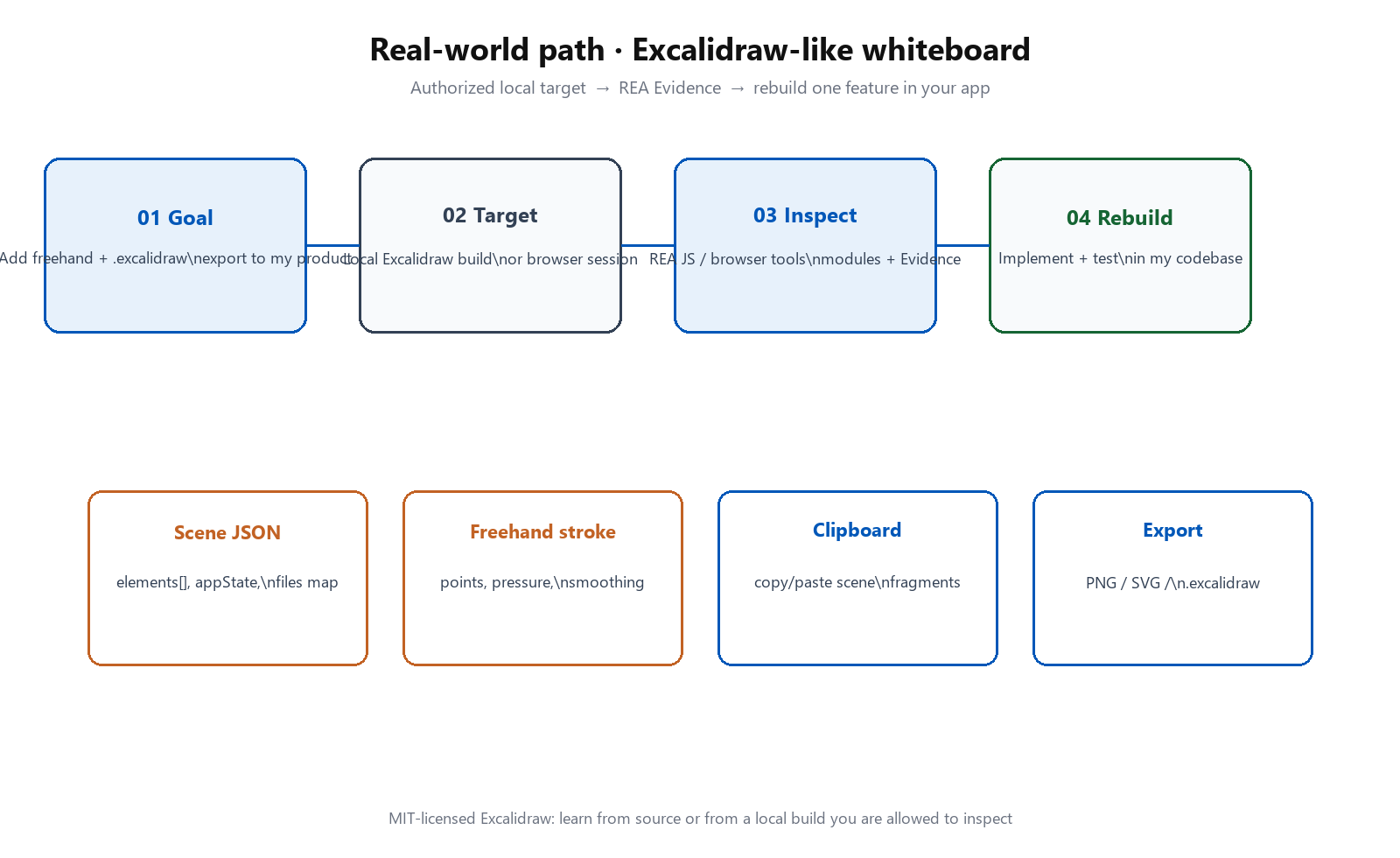
I wanted a whiteboard I could put on my own domain. Excalidraw already feels the way a sketching tool should feel: loose strokes, a small set of tools, a drawing that stays in the browser. The public project is MIT-licensed, which is a gift if you want to read it. I did not take that gift as a zip file of their app. I asked an agent to study the running site with REA, then write something of mine.
That distinction is the whole point. Reading a repository and pasting it into your folder is copying. Watching a product, naming the rules you can see, and writing new code is how you learn the product and still own the result. Quire is the second thing. You can draw on it at tanuisila.dev/quire. The source sits at github.com/silatanui/quire.
What came back is a board with a hand, a selection tool, rectangles, diamonds, ellipses, arrows, lines, freehand ink, text, sticky notes, and an eraser. You can lock a tool so it stays active. You can pan with the hand, the space bar, or the middle mouse button. You can zoom, undo, and redo. A drawing survives a refresh because it lives in the browser, not on my server. A style card controls ink, wash, hatch, line weight, dash, wobble, square or soft corners, fade, lettering size, and stacking order. The menu opens a file, keeps a copy, exports a picture, passes a JSON snapshot, finds words on the canvas, and lets you pick a paper color. There is no account, no chat room, and no live session. Sketch strokes use rough.js, which is MIT and credited in the repo. The names on the buttons are mine.
The prompt that gets you this
The session that produced Quire started with a short ask: use morluto/rea, and reverse engineer excalidraw.com. Two later notes carried screenshots of the menu and the style card, with one rule written in plain speech: do not copy and paste, be original. If you want the same shape of result in one pass, paste this. It is the prompt I would hand someone tomorrow.
Use REA (https://github.com/morluto/rea) to reverse engineer the public whiteboard at https://excalidraw.com/.

Inspect the live page with REA. Recover the tools, shortcuts, and interaction rules a person can actually see: selection, shapes, arrows, lines, freehand, text, sticky notes, eraser, pan, zoom, undo, and the fact that a drawing stays in the browser.

Then build an original whiteboard in this folder. Do not copy their source, branding, logo, accounts, or live collaboration. Write your own scene model and your own interface. You may use rough.js (MIT) for the sketch strokes, and you must keep its license. Name the product yourself.

Include a menu for opening a file, saving a copy, exporting a picture, passing a JSON snapshot, finding text, help, and clearing the board, plus theme, language, and paper color. Include a style card for stroke color, background, stroke width, stroke style, sloppiness, sharp or round corners, opacity, and layer order. Use your own labels and icons.

Keep drawings in localStorage. Verify the tools by using them.
That prompt works because it names the tool, the target, the behavior to recover, the thing to build, and the line you will not cross. A shorter prompt still works. Mine did. The menu and the style card arrived when I showed them and said to invent, not to trace. If your first board is missing a panel, send the picture and the same sentence. Do not ask the agent to become Excalidraw.
npx -y rea-agents@latest inspect-web-page --include-accessibility-textThat is the kind of command the agent ran against a Chrome window already open on the live site. It reads the page a person can reach: the tool names, the shortcuts, the structure of the canvas. It is not a download of their private repository, and it is not a license to ship their logo. Install REA first with npx rea-agents setup, then restart the agent so the MCP server is actually there.
What the inspection was allowed to say
Good evidence here is a list of things a person can do, with the keys beside them. It is not a paste of their bundle. From the live page, the agent could see a hand (H), selection (V), rectangle (R), diamond (D), ellipse (O), arrow (A), line (L), draw (P), text (T), a sticky note (N), and an eraser (E). It could see that the middle mouse button, the space bar, and the hand tool all pan, and that a drawing is kept in the browser. That was enough to build a board. It was not enough, and not a reason, to reproduce their accounts, their collaboration servers, or their shape library. Those stayed out.
Quire stores a drawing in its own envelope. This is ours, written after the inspection, not a copy of their file:
{
  "type": "drawexcal",
  "version": 1,
  "elements": [
    {
      "id": "stroke-1",
      "type": "freedraw",
      "x": 120,
      "y": 80,
      "points": [{ "x": 0, "y": 0 }, { "x": 12, "y": 4 }],
      "strokeColor": "#1e1e1e",
      "strokeWidth": 2,
      "roughness": 1
    }
  ]
}
If a conclusion cannot point at something that was seen, it does not belong in the write-up. A full-page screenshot hung once during this work. That missing picture was not filled in with a guess. Later checks, drawing a rectangle, typing, undoing, erasing, covered the behavior instead.
What this makes possible
Most of us already know the feeling. You use a tool for an hour and think, I want that in mine. Then you spend a week clicking, guessing, and reading other people’s blog posts about a menu you could have looked at. REA shortens that week into an afternoon, if you are willing to be specific and to throw away the parts you are not allowed to take.
A few situations where I would reach for it again:
- You admire a behavior, not a brand. Selection that hits the inside of an empty box. Undo that refuses to fire in the middle of a drag. A stroke that looks drawn, not plotted. Those are ideas. Quire is one idea, rebuilt and renamed.
- You inherited your own old app. The person who wrote it left. The wiki is stale. Point REA at a build you own and ask one question: how does save work, where does this button go, why does this file fail to open.
- A customer already has the file. You need to read a format, not to become the other product. Evidence of the fields, then a small importer you wrote, is a kinder path than “we will support it someday.”
- You are teaching. Students learn interaction by rebuilding a rule they watched. They do not learn it by dropping someone else’s repository into a homework folder.
- The author is gone and the program matters. Preservation is a real use. An old calculator, an old game, a campus tool nobody can reinstall. Recover the rule, write it down, keep a small version running.
The feeling I want you to leave with is ordinary, not magical. You can look at a public product, say what it does in a sentence, and have a working cousin by the end of the day. Quire is that cousin. It is not Excalidraw with the logo scratched off.
Where I would not use REA
The tool is good at looking. That is also why it is easy to aim at the wrong thing. These are the jobs I turn down.
- You are not allowed to look. A private repository you were not given, a laptop that is not yours, a cracked copy, a bank app, a coworker's production server. “I can open the URL” is not the same as “I may study this and ship a twin.”
- The goal is to get in. Stealing a password, skipping a license, walking around a paywall, or turning a trial into a full product. REA is an investigation aid. It is not a burglary kit, and I will not write the second thing.
- You want their skin. Behavior can inspire an original board. Their name, their logo, their exact icons, and a pixel copy of the marketing site cannot. If a visitor cannot tell your product from theirs, you did not reverse engineer. You counterfeited.
- The answer is already in a license you can read. Excalidraw publishes its source. If you truly need their algorithm, read it and obey the MIT terms. REA on the live site was the right tool for “what does a person do here?” It is the wrong tool for “paste their modules into my repo.”
- The interesting part is on a server you cannot see. Accounts, billing, and live collaboration live behind a login and a private API. Inspecting the public canvas will not hand you those. Quire stops at the board on purpose. Pretending otherwise is how write-ups become fiction.
- The change is small. A new sentence, a color, a form field. Describe it. An investigation is a heavy tool for a heavy question.
- You want the entire product in one breath. I asked for the board, then the menu, then the style card. One trail at a time is how the evidence stays honest. A prompt that says “clone the company” produces a costume.
There is a quieter limit too. A site’s terms can forbid automated collection even when the page is public. Read them. And if a screenshot fails or a control is hidden, say that it failed. A missing fact is more useful than a smooth paragraph that invented it.
“Ask for the behavior you can see. Build something you can name. Leave their brand, their servers, and their source where you found them.”
Worked example: Calculator’s percent button
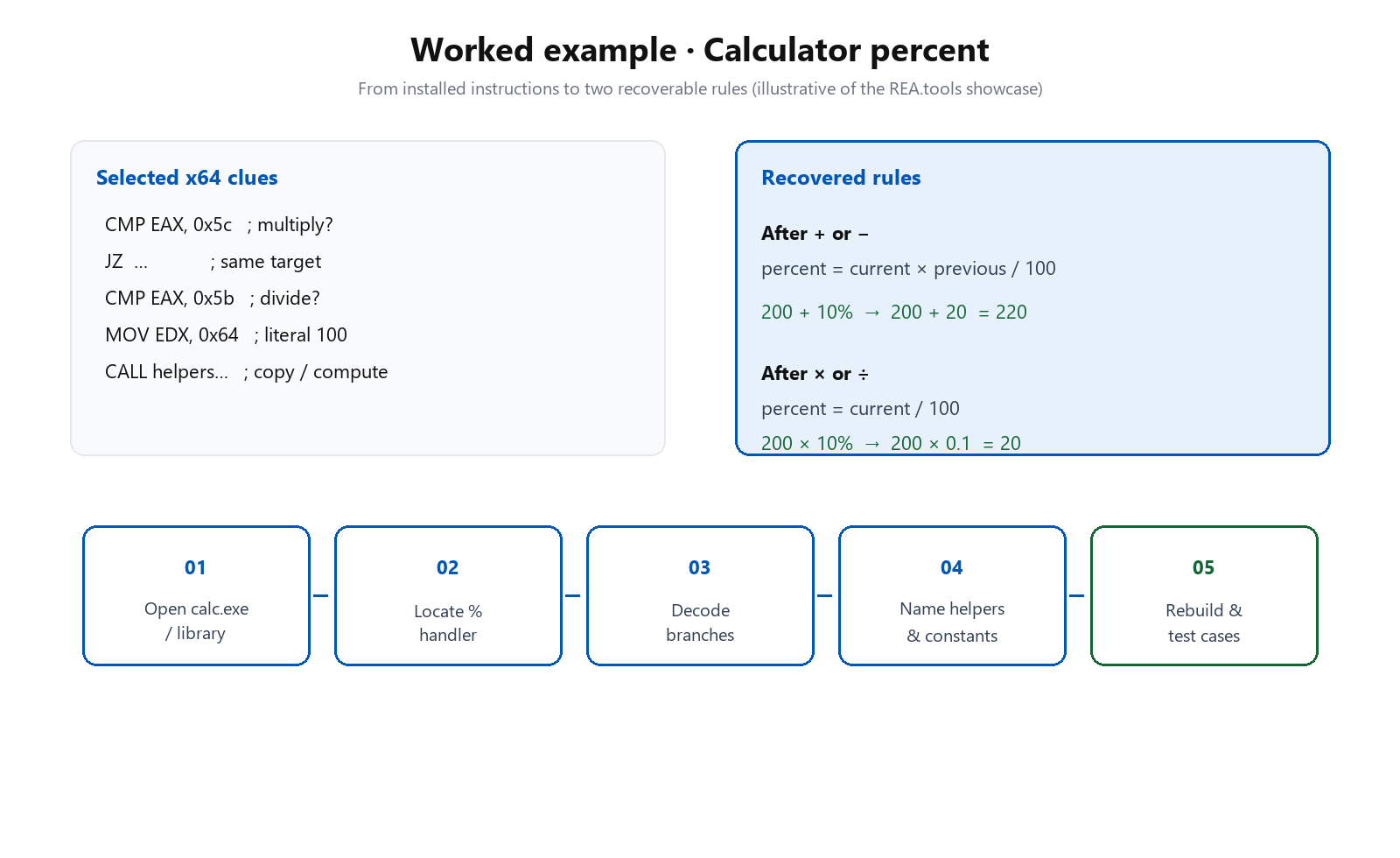
rea.tools walks a crisp teaching case: why does Windows Calculator return 220 for 200 + 10%? The interesting answer is not “because percent means percent.” It is that the handler branches on the pending operator.
Selected instructions compare the operator id against multiply (0x5c) and divide (0x5b), load the literal 100 (0x64), and call helpers. After decoding those branches against public Microsoft identifiers, the recovered rules are:
- After + or −: take a percent of the previous value (
current × previous / 100). So200 + 10%becomes200 + 20. - After × or ÷: treat the current entry as a percentage factor (
current / 100). So200 × 10%becomes200 × 0.1.
That is the REA product thesis in miniature. The agent does not invent a percent story. It follows instructions, names constants, recovers a rule, and can rebuild a small calculator that preserves both behaviors. The same pattern appears in the DX-Ball sound-pan reconstruction (thousands of original-x86 cases) and the TH04 DOS bullet-ring recovery on PC-98.
CLI habits that keep agents sane
A few operational truths from the CLI and Evidence guide worth internalizing:
- Each CLI invocation is a separate process. Save results when you need them later. MCP sessions retain Evidence; CLI does not magically share memory across shells.
- Project before you paste. Prefer summary and page views over dumping multi-hundred-megabyte JSON into a model.
- JSONL is for rows. Use
--format jsonlwhen you want one record per line from a clear collection. Use JSON for complete documents. - Empty paths are rejected. An empty string never means “current directory.” Be explicit.
- Update often.
rea update(ornpx rea-agents@latest setup) is part of the support culture; releases move quickly.
Showcases worth studying
Beyond Calculator, the public showcases are the best curriculum:
- DX-Ball sound pan. Follow a sound call into a position-to-pan helper, turn incomplete pseudocode into C, and validate against thousands of original instruction cases. Reconstruction repository: N0zoM1z0/dx-ball.
- Notion clipboard bridge. Packaged JavaScript from renderer through preload/IPC to system clipboard formats.
- TH04 bullet ring. 16-bit PC-98 instructions, fixed and aimed angles, comparison with historical compiler output. Reconstruction repository: N0zoM1z0/th04.
- Dinosaur speed rule. Browser runtime inspection recovers acceleration constants and lets you rebuild a controllable mini-game.
Each showcase reinforces the same discipline: narrow the question, collect Evidence, name the rule, rebuild, test against the original behavior.
Design lessons for anyone building agent tools
Even if you never open a binary, REA is a case study in agent infrastructure:
- Prefer contracts over chat logs. Authenticated records beat free-form tool dumps when later steps must compare or resume.
- Page large truths. Summaries and facet views keep models inside context while the full dossier remains available.
- Own the process lifecycle. Decompilers and browsers are long-lived, crashy children. Deadlines, private roots, and cleanup are product features.
- Make unknowns explicit. An unavailable decompiler facet that still returns listing-backed assembly is more useful than a silent empty string.
- Separate static from runtime. Reading files is not the same permission story as launching the target. Guides should say so.
- Ship setup that installs the skill. Tools without investigation instructions leave agents guessing which tool to call next.
Responsible use
REA’s MIT-licensed code and third-party notices are clear about scope. Use it on software you own or are authorized to examine: research, education, interoperability, preservation. Do not treat it as a kit for unauthorized access, license bypass, or cracked engines. Commercial analysis tools remain under vendor terms. Trials and demos have their own restrictions. That ethical boundary is part of what makes the project usable in professional settings.
Where to go next
Open Quire and draw a box. That is the claim of this essay, sitting on a page, not in a diagram. Then read morluto/rea and the guides at rea.tools. Install with npx rea-agents setup, restart the agent, and paste the prompt above only at a target you are allowed to study.
Reverse engineering used to mean a lonely window and a notebook. REA’s bet is that an agent can share that work when it has to show what it saw, keep the analysis on your machine, and say when it does not know. Quire is my test of that bet. It is a board I can host. It is not their board with the name filed off.
Essay by Tanui Kipngetich Sila · diagrams generated for this post from REA’s public docs and showcases
Sources: github.com/morluto/rea, rea.tools, excalidraw.com as the inspected public app, Quire, github.com/silatanui/quire, npm rea-agents.
Leave a comment
Email stays private. Name and email are optional.